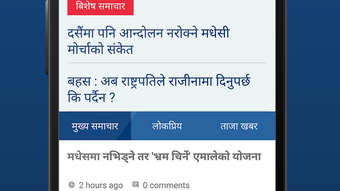

Download Onlinekhabar – news, Nepal, online news, latest news, world news, digital news, breaking news, news portal, news app, online news portal
Overview
Onlinekhabar is a digital news portal designed to deliver real-time updates on current events from Nepal and around the globe. Established in 2006, it has grown into one of the most prominent sources of information for Nepalese communities worldwide, serving audiences across more than 140 countries. The platform operates as a free service, accessible through its Android application, ensuring users can stay informed regardless of location.
It covers a broad spectrum of topics including politics, economics, social developments, and entertainment, with content refreshed every second to reflect the latest breaking news. The app is tailored for both local and diaspora audiences seeking reliable, timely updates on national and international affairs. Its purpose is to bridge information gaps by providing a centralized, easily accessible source of verified news.
While the developer did not provide additional details about editorial processes or content verification methods, the long-standing presence of the portal suggests a commitment to consistent delivery. The application is ideal for users who prioritize up-to-date reporting and require a dependable source for Nepali and global news.
Key Features & Capabilities
- Real-time news updates: The app delivers breaking news continuously, ensuring users are informed within seconds of major developments.
- Multi-category news access: Users can browse news under dedicated sections such as politics, economy, society, and entertainment for organized content discovery.
- Offline reading: Articles can be saved for later viewing, allowing access without an internet connection.
- Content sharing: Built-in sharing tools enable users to send news stories to friends and family via messaging platforms or social media.
- Intuitive navigation: The app features a clean layout with easy-to-use menus, simplifying the process of finding relevant news.
These features support efficient information consumption, particularly for users managing multiple interests or seeking news on the go. The ability to save articles is especially useful for travelers or individuals in areas with limited connectivity. Sharing functionality enhances community engagement, allowing users to spread important updates.
The app’s structure promotes quick access to diverse topics, reducing time spent searching. While specific technical details about content curation or algorithmic recommendations were not provided, the consistent categorization suggests a user-centric design approach. Overall, the capabilities are well-suited for daily news consumption and long-term information tracking.
User Interface, Workflow & Performance
The user interface of Onlinekhabar is structured to prioritize clarity and accessibility. The main screen displays a feed of headlines, organized by category and timestamp, enabling users to scan recent stories quickly. Navigation is handled through a bottom tab bar, which provides one-touch access to key sections.
The layout is minimalistic, reducing visual clutter and improving readability. Workflow efficiency is enhanced by the ability to swipe through articles and save them with a single tap. The app’s performance is consistent with standard Android applications of similar scope.
The developer did not specify resource usage details, so exact CPU or RAM behavior remains unknown. However, the 10 MB installation size suggests a lightweight footprint, which typically correlates with lower system demands. Stability appears reliable based on the app’s long-standing operation, though no official metrics on crash rates or update frequency were shared.
General software behavior patterns indicate smooth performance under normal usage conditions. The app responds promptly to user inputs, and content loads without noticeable delays in most environments. While no performance benchmarks were provided, the design supports a seamless experience across a range of Android devices.
Compatibility & System Requirements
Onlinekhabar is designed for the Android operating system, ensuring compatibility with a wide range of mobile devices. The current version is 1.0.2, released on September 21, 2023. The app has a file size of 10 MB, indicating a compact installation that requires minimal storage space.
This makes it suitable for devices with limited internal memory. The developer did not specify exact system requirements, such as minimum Android version or hardware specifications. As a result, compatibility with older or newer Android models remains unconfirmed.
Users are advised to ensure their device meets general Android app standards to avoid installation issues. The app does not require root access or special permissions beyond standard network and storage access. Platform compatibility information is limited, and no details were provided regarding support for tablets or other form factors.
The absence of detailed technical specifications means users should rely on general Android compatibility guidelines when installing the application.
Pros and Cons
Pros
- Free to download and use with no in-app purchases
- Real-time news updates with content refreshed every second
- Comprehensive coverage of Nepal-specific and global news
- Offline reading capability for saved articles
- Simple, intuitive interface suitable for all age groups
Cons
- Limited to Android platform; no support for iOS or desktop
- Exact system requirements not publicly listed
- No information on content verification or editorial standards
- App size is small but may lack advanced customization options
- Updates and version history details are not transparent
FAQ Section
Is Onlinekhabar available for iOS devices?
Currently, the app is only available for Android. There is no official iOS version reported.
Can I use Onlinekhabar without an internet connection?
Yes, you can access articles you’ve saved for offline reading. However, live updates and new content require an active internet connection.
Is the app safe to download and use?
As a free application published on official Android channels, it is considered secure. Always download from trusted sources to avoid third-party modifications.
How often is the app updated?
The latest version, 1.0.2, was released on September 21, 2023. The update frequency is not publicly disclosed.
Does Onlinekhabar require a subscription or payment?
No, the app is completely free to download and use. There are no paid features or subscription models currently in place.
Final Thoughts + CTA
Onlinekhabar stands out as a reliable and accessible platform for staying informed about news from Nepal and around the world. Its real-time updates, user-friendly interface, and offline functionality make it a practical tool for both daily readers and those in remote or low-connectivity areas. While it is currently limited to Android, its lightweight design and free access ensure broad reach.
The app effectively serves its core purpose: delivering timely, relevant information to a global Nepali audience. For users seeking a straightforward, no-frills news experience with a strong regional focus, Onlinekhabar offers a compelling solution. Despite some limitations in transparency around technical specs and editorial processes, its long-standing presence and widespread use suggest trustworthiness.
If you're looking for a dependable source of digital news, especially with a focus on Nepal, this app delivers value without cost. Download Onlinekhabar now.







